前情回顾
前面我们实现了聊天资源的下载和上传,以及异步通知断点下载等功能。
今天主要实现登录后聊天信息的加载,之前把文本信息的加载实现了,现在需要实现用户登录后图片信息的加载。
这个功能做完,聊天的基本功能就都收尾了,有意思的是好像一个圆圈,我们又回到了最初的原点,从登录逻辑出发,补充聊天资源加载
登录流程回顾
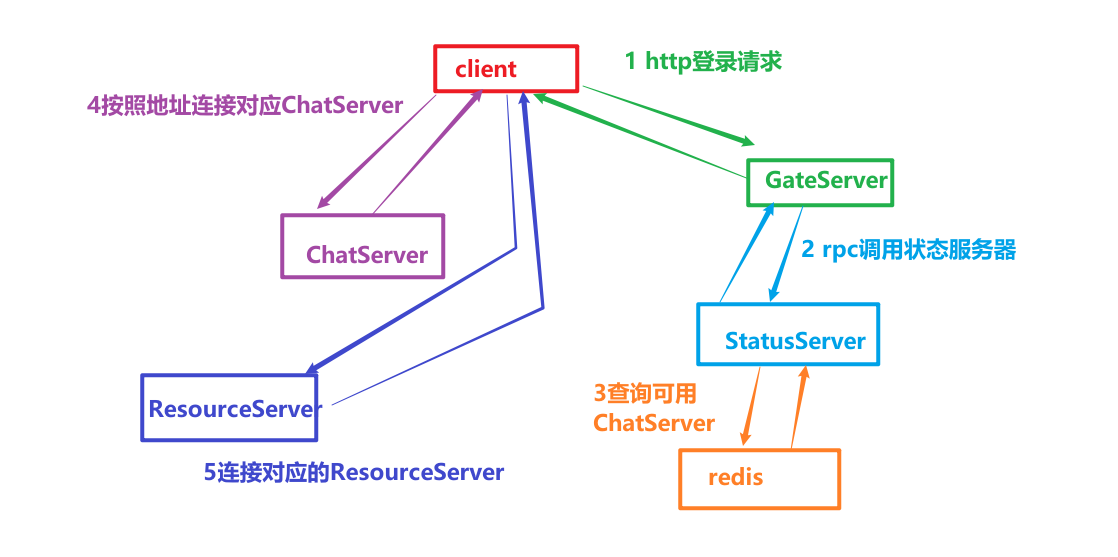
点击登录按钮后,通过HttpMgr发送登录请求
void LoginDialog::on_login_btn_clicked(){qDebug()<<"login btn clicked";if(checkUserValid() == false){return;}if(checkPwdValid() == false){return ;}enableBtn(false);auto email = ui->email_edit->text();auto pwd = ui->pass_edit->text();//发送http请求登录QJsonObject json_obj;json_obj["email"] = email;json_obj["passwd"] = xorString(pwd);HttpMgr::GetInstance()->PostHttpReq(QUrl(gate_url_prefix+"/user_login"),json_obj, ReqId::ID_LOGIN_USER,Modules::LOGINMOD);}
HttpMgr内部封装了PostHttpReq接口,这是异步http请求,会提前构造好一个reply,以及注册一个回调函数,将来GateServer将登录信息返回后会出发这个回调函数
void HttpMgr::PostHttpReq(QUrl url, QJsonObject json, ReqId req_id, Modules mod){//创建一个HTTP POST请求,并设置请求头和请求体QByteArray data = QJsonDocument(json).toJson();//通过url构造请求QNetworkRequest request(url);request.setHeader(QNetworkRequest::ContentTypeHeader, "application/json");request.setHeader(QNetworkRequest::ContentLengthHeader, QByteArray::number(data.length()));//发送请求,并处理响应, 获取自己的智能指针,构造伪闭包并增加智能指针引用计数auto self = shared_from_this();QNetworkReply * reply = _manager.post(request, data);//设置信号和槽等待发送完成QObject::connect(reply, &QNetworkReply::finished, [reply, self, req_id, mod](){//处理错误的情况if(reply->error() != QNetworkReply::NoError){qDebug() << reply->errorString();//发送信号通知完成emit self->sig_http_finish(req_id, "", ErrorCodes::ERR_NETWORK, mod);reply->deleteLater();return;}//无错误则读回请求QString res = reply->readAll();//发送信号通知完成emit self->sig_http_finish(req_id, res, ErrorCodes::SUCCESS,mod);reply->deleteLater();return;});}
我们查看下GateServer的处理流程
bool LogicSystem::HandlePost(std::string path, std::shared_ptr<HttpConnection> con) {if (_post_handlers.find(path) == _post_handlers.end()) {return false;}_post_handlers[path](con);return true;}
服务器会根据客户端传递的url进行分析,然后去_post_handlers中根据path查找并调用回调函数
回调函数在LogicSystem中提前注册到_post_handlers中
void LogicSystem::RegPost(std::string url, HttpHandler handler) {_post_handlers.insert(make_pair(url, handler));}
在构造函数中调用RegPost注册消息
//用户登录逻辑RegPost("/user_login", [](std::shared_ptr<HttpConnection> connection) {auto body_str = boost::beast::buffers_to_string(connection->_request.body().data());std::cout << "receive body is " << body_str << std::endl;connection->_response.set(http::field::content_type, "text/json");Json::Value root;Json::Reader reader;Json::Value src_root;bool parse_success = reader.parse(body_str, src_root);if (!parse_success) {std::cout << "Failed to parse JSON data!" << std::endl;root["error"] = ErrorCodes::Error_Json;std::string jsonstr = root.toStyledString();beast::ostream(connection->_response.body()) << jsonstr;return true;}auto email = src_root["email"].asString();auto pwd = src_root["passwd"].asString();UserInfo userInfo;//查询数据库判断用户名和密码是否匹配bool pwd_valid = MysqlMgr::GetInstance()->CheckPwd(email, pwd, userInfo);if (!pwd_valid) {std::cout << " user pwd not match" << std::endl;root["error"] = ErrorCodes::PasswdInvalid;std::string jsonstr = root.toStyledString();beast::ostream(connection->_response.body()) << jsonstr;return true;}//查询StatusServer找到合适的连接auto reply = StatusGrpcClient::GetInstance()->GetChatServer(userInfo.uid);if (reply.error()) {std::cout << " grpc get chat server failed, error is " << reply.error()<< std::endl;root["error"] = ErrorCodes::RPCFailed;std::string jsonstr = root.toStyledString();beast::ostream(connection->_response.body()) << jsonstr;return true;}std::cout << "succeed to load userinfo uid is " << userInfo.uid << std::endl;root["error"] = 0;root["email"] = email;root["uid"] = userInfo.uid;root["token"] = reply.token();root["chathost"] = reply.host();root["chatport"] = reply.port();auto& gCfgMgr = ConfigMgr::Inst();std::string res_port = gCfgMgr["ResServer"]["Port"];std::string res_host = gCfgMgr["ResServer"]["Host"];root["reshost"] = res_host;root["resport"] = res_port;std::string jsonstr = root.toStyledString();beast::ostream(connection->_response.body()) << jsonstr;return true;});
所以GateServer会触发上面的lambda表达式处理
在lambda表达式中调用GRPC连接池,向StatusServer发送请求,获取可用的聊天服务器地址,将聊天服务器地址返回给GateServer,GateServer再将地址返回给客户端, rpc封装
GetChatServerRsp StatusGrpcClient::GetChatServer(int uid){ClientContext context;GetChatServerRsp reply;GetChatServerReq request;request.set_uid(uid);auto stub = pool_->getConnection();Status status = stub->GetChatServer(&context, request, &reply);Defer defer([&stub, this]() {pool_->returnConnection(std::move(stub));});if (status.ok()) {return reply;}else {reply.set_error(ErrorCodes::RPCFailed);return reply;}}
客户端收到GateServer回复后,客户端会根据消息ID为ReqId::ID_LOGIN_USER发送sig_http_finish信号通知
该信号连接了
HttpMgr::HttpMgr(){//连接http请求和完成信号,信号槽机制保证队列消费connect(this, &HttpMgr::sig_http_finish, this, &HttpMgr::slot_http_finish);}
分别对应三个请求的处理
void HttpMgr::slot_http_finish(ReqId id, QString res, ErrorCodes err, Modules mod){if(mod == Modules::REGISTERMOD){//发送信号通知指定模块http响应结束emit sig_reg_mod_finish(id, res, err);}if(mod == Modules::RESETMOD){//发送信号通知指定模块http响应结束emit sig_reset_mod_finish(id, res, err);}if(mod == Modules::LOGINMOD){emit sig_login_mod_finish(id, res, err);}}
对于登录请求,主要逻辑在sig_login_mod_finish信号发出看,该信号在LoginDialog中连接
//连接登录回包信号connect(HttpMgr::GetInstance().get(), &HttpMgr::sig_login_mod_finish, this,&LoginDialog::slot_login_mod_finish);
进而出发槽函数
void LoginDialog::slot_login_mod_finish(ReqId id, QString res, ErrorCodes err){if(err != ErrorCodes::SUCCESS){showTip(tr("网络请求错误"),false);return;}// 解析 JSON 字符串,res需转化为QByteArrayQJsonDocument jsonDoc = QJsonDocument::fromJson(res.toUtf8());//json解析错误if(jsonDoc.isNull()){showTip(tr("json解析错误"),false);return;}//json解析错误if(!jsonDoc.isObject()){showTip(tr("json解析错误"),false);return;}//调用对应的逻辑,根据id回调。_handlers[id](jsonDoc.object());return;}
槽函数中根据id获取提前注册好的回调函数
_handlers[id](jsonDoc.object());
之前的注册逻辑
void LoginDialog::initHttpHandlers(){//注册获取登录回包逻辑_handlers.insert(ReqId::ID_LOGIN_USER, [this](QJsonObject jsonObj){int error = jsonObj["error"].toInt();if(error != ErrorCodes::SUCCESS){showTip(tr("参数错误"),false);enableBtn(true);return;}auto email = jsonObj["email"].toString();//发送信号通知tcpMgr发送长链接_si = std::make_shared<ServerInfo>();_si->_uid = jsonObj["uid"].toInt();_si->_chat_host = jsonObj["chathost"].toString();_si->_chat_port = jsonObj["chatport"].toString();_si->_token = jsonObj["token"].toString();_si->_res_host = jsonObj["reshost"].toString();_si->_res_port = jsonObj["resport"].toString();qDebug()<< "email is " << email << " uid is " << _si->_uid <<" chat host is "<< _si->_chat_host << " chat port is "<< _si->_chat_port << " token is " << _si->_token<< " res host is " << _si->_res_host<< " res port is " << _si->_res_port;emit sig_connect_tcp(_si);// qDebug() << "send thread is " << QThread::currentThread();// emit sig_test();});}
所以当消息到来时会出发上面的lambda表达式,进而发出sig_connect_tcp信号, 该信号链接槽函数slot_tcp_connect
//连接tcp连接请求的信号和槽函数connect(this, &LoginDialog::sig_connect_tcp, TcpMgr::GetInstance().get(), &TcpMgr::slot_tcp_connect);
槽函数内根据host地址链接指定的tcpserver
void TcpMgr::slot_tcp_connect(std::shared_ptr<ServerInfo> si){qDebug()<< "receive tcp connect signal";// 尝试连接到服务器qDebug() << "Connecting to chat server...";_host = si->_chat_host;_port = static_cast<uint16_t>(si->_chat_port.toUInt());_socket.connectToHost(_host, _port);}
_socket 是QTcpSocket类型,发出连接请求后,如果和服务器建立好连接后,会触发链接成功的回调, 在TcpMgr的构造函数中提前注册了消息和回调函数
TcpMgr::TcpMgr():_host(""),_port(0),_b_recv_pending(false),_message_id(0),_message_len(0),_bytes_sent(0),_pending(false){registerMetaType();QObject::connect(&_socket, &QTcpSocket::connected, this, [&]() {qDebug() << "Connected to server!";// 连接建立后发送消息emit sig_con_success(true);});QObject::connect(&_socket, &QTcpSocket::readyRead, this, [&]() {// 当有数据可读时,读取所有数据// 读取所有数据并追加到缓冲区_buffer.append(_socket.readAll());forever {//先解析头部if(!_b_recv_pending){// 检查缓冲区中的数据是否足够解析出一个消息头(消息ID + 消息长度)if (_buffer.size() < static_cast<int>(sizeof(quint16) * 2)) {return; // 数据不够,等待更多数据}// ✅ 每次都重新创建streamQDataStream stream(_buffer);stream.setVersion(QDataStream::Qt_5_0);stream >> _message_id >> _message_len;_buffer.remove(0, sizeof(quint16) * 2); // 使用remove代替mid赋值qDebug() << "Message ID:" << _message_id << ", Length:" << _message_len;}//buffer剩余长读是否满足消息体长度,不满足则退出继续等待接受if(_buffer.size() < _message_len){_b_recv_pending = true;return;}_b_recv_pending = false;// 读取消息体QByteArray messageBody = _buffer.mid(0, _message_len);qDebug() << "receive body msg is " << messageBody ;_buffer = _buffer.mid(_message_len);handleMsg(ReqId(_message_id),_message_len, messageBody);}});//5.15 之后版本// QObject::connect(&_socket, QOverload<QAbstractSocket::SocketError>::of(&QTcpSocket::errorOccurred), [&](QAbstractSocket::SocketError socketError) {// Q_UNUSED(socketError)// qDebug() << "Error:" << _socket.errorString();// });// 处理错误(适用于Qt 5.15之前的版本)QObject::connect(&_socket, static_cast<void (QTcpSocket::*)(QTcpSocket::SocketError)>(&QTcpSocket::error),this,[&](QTcpSocket::SocketError socketError) {qDebug() << "Error:" << _socket.errorString() ;switch (socketError) {case QTcpSocket::ConnectionRefusedError:qDebug() << "Connection Refused!";emit sig_con_success(false);break;case QTcpSocket::RemoteHostClosedError:qDebug() << "Remote Host Closed Connection!";break;case QTcpSocket::HostNotFoundError:qDebug() << "Host Not Found!";emit sig_con_success(false);break;case QTcpSocket::SocketTimeoutError:qDebug() << "Connection Timeout!";emit sig_con_success(false);break;case QTcpSocket::NetworkError:qDebug() << "Network Error!";break;default:qDebug() << "Other Error!";break;}});// 处理连接断开QObject::connect(&_socket, &QTcpSocket::disconnected, this,[&]() {qDebug() << "Disconnected from server.";//并且发送通知到界面emit sig_connection_closed();});//连接发送信号用来发送数据QObject::connect(this, &TcpMgr::sig_send_data, this, &TcpMgr::slot_send_data);//连接发送信号QObject::connect(&_socket, &QTcpSocket::bytesWritten, this, [this](qint64 bytes) {//更新发送数据_bytes_sent += bytes;//未发送完整if (_bytes_sent < _current_block.size()) {//继续发送auto data_to_send = _current_block.mid(_bytes_sent);_socket.write(data_to_send);return;}//发送完全,则查看队列是否为空if (_send_queue.isEmpty()) {//队列为空,说明已经将所有数据发送完成,将pending设置为false,这样后续要发送数据时可以继续发送_current_block.clear();_pending = false;_bytes_sent = 0;return;}//队列不为空,则取出队首元素_current_block = _send_queue.dequeue();_bytes_sent = 0;_pending = true;qint64 w2 = _socket.write(_current_block);qDebug() << "[TcpMgr] Dequeued and write() returned" << w2;});//关闭socketconnect(this, &TcpMgr::sig_close, this, &TcpMgr::slot_tcp_close);//注册消息initHandlers();}
当客户端和服务器建立连接后,会出发下面的lambda表达式
QObject::connect(&_socket, &QTcpSocket::connected, this, [&]() {qDebug() << "Connected to server!";// 连接建立后发送消息emit sig_con_success(true);});
从而发出sig_con_success信号, 信号连接了槽函数slot_tcp_con_finish
//连接tcp管理者发出的连接成功信号connect(TcpMgr::GetInstance().get(), &TcpMgr::sig_con_success, this, &LoginDialog::slot_tcp_con_finish);
槽函数里链接资源服务器
void LoginDialog::slot_tcp_con_finish(bool bsuccess){if(bsuccess){showTip(tr("聊天服务连接成功,正在连接资源服务器..."),true);emit sig_connect_res_server(_si);}else{showTip(tr("网络异常"), false);}}
该信号连接了槽函数
//连接tcp连接资源服务器请求的信号和槽函数connect(this, &LoginDialog::sig_connect_res_server,FileTcpMgr::GetInstance().get(), &FileTcpMgr::slot_tcp_connect);
链接资源服务器的逻辑和之前链接ChatServer类似
void FileTcpMgr::slot_tcp_connect(std::shared_ptr<ServerInfo> si){qDebug() << "receive tcp connect signal";// 尝试连接到服务器qDebug() << "Connecting to server...";_host = si->_res_host;_port = static_cast<uint16_t>(si->_res_port.toUInt());_socket.connectToHost(_host, _port);}
当客户端链接资源服务器成功了,就会出发lambda表达式
QObject::connect(&_socket, &QTcpSocket::connected, this, [&]() {qDebug() << "Connected to server!";emit sig_con_success(true);});
信号sig_con_success和槽函数链接
connect(FileTcpMgr::GetInstance().get(), &FileTcpMgr::sig_con_success, this, &LoginDialog::slot_res_con_finish);
进而触发这个函数,内部发送登录请求给ChatServer
void LoginDialog::slot_res_con_finish(bool bsuccess){if(bsuccess){showTip(tr("聊天服务连接成功,正在登录..."),true);QJsonObject jsonObj;jsonObj["uid"] = _si->_uid;jsonObj["token"] = _si->_token;QJsonDocument doc(jsonObj);QByteArray jsonData = doc.toJson(QJsonDocument::Indented);//发送tcp请求给chat serveremit TcpMgr::GetInstance()->sig_send_data(ReqId::ID_CHAT_LOGIN, jsonData);}else{showTip(tr("网络异常"),false);enableBtn(true);}}
这里略去ChatServer的处理,客户端收到ID_CHAT_LOGIN_RSP回复后,出发lambda表达式
_handlers.insert(ID_CHAT_LOGIN_RSP, [this](ReqId id, int len, QByteArray data){Q_UNUSED(len);qDebug()<< "handle id is "<< id ;// 将QByteArray转换为QJsonDocumentQJsonDocument jsonDoc = QJsonDocument::fromJson(data);// 检查转换是否成功if(jsonDoc.isNull()){qDebug() << "Failed to create QJsonDocument.";return;}QJsonObject jsonObj = jsonDoc.object();qDebug()<< "data jsonobj is " << jsonObj ;if(!jsonObj.contains("error")){int err = ErrorCodes::ERR_JSON;qDebug() << "Login Failed, err is Json Parse Err" << err ;emit sig_login_failed(err);return;}int err = jsonObj["error"].toInt();if(err != ErrorCodes::SUCCESS){qDebug() << "Login Failed, err is " << err ;emit sig_login_failed(err);return;}auto uid = jsonObj["uid"].toInt();auto name = jsonObj["name"].toString();auto nick = jsonObj["nick"].toString();auto icon = jsonObj["icon"].toString();auto sex = jsonObj["sex"].toInt();auto desc = jsonObj["desc"].toString();auto user_info = std::make_shared<UserInfo>(uid, name, nick, icon, sex,"",desc);UserMgr::GetInstance()->SetUserInfo(user_info);UserMgr::GetInstance()->SetToken(jsonObj["token"].toString());if(jsonObj.contains("apply_list")){UserMgr::GetInstance()->AppendApplyList(jsonObj["apply_list"].toArray());}//添加好友列表if (jsonObj.contains("friend_list")) {UserMgr::GetInstance()->AppendFriendList(jsonObj["friend_list"].toArray());}emit sig_swich_chatdlg();});
将用户信息,以及好友列表,申请列表等数据组织好后存储UserMgr中,然后发送信号sig_swich_chatdlg跳转到登录界面
链接信号
//连接创建聊天界面信号connect(TcpMgr::GetInstance().get(),&TcpMgr::sig_swich_chatdlg, this, &MainWindow::SlotSwitchChat);
跳转逻辑
void MainWindow::SlotSwitchChat(){_chat_dlg = new ChatDialog();_chat_dlg->setWindowFlags(Qt::CustomizeWindowHint|Qt::FramelessWindowHint);setCentralWidget(_chat_dlg);_chat_dlg->show();_login_dlg->hide();this->setMinimumSize(QSize(1050,900));this->setMaximumSize(QWIDGETSIZE_MAX, QWIDGETSIZE_MAX);_ui_status = CHAT_UI;_chat_dlg->loadChatList();}
至此完成登录界面加载以及聊天记录加载,聊天记录加载具体流程看下面
加载聊天记录
其中加载聊天记录核心逻辑
void ChatDialog::loadChatList(){showLoadingDlg(true);//发送请求逻辑QJsonObject jsonObj;auto uid = UserMgr::GetInstance()->GetUid();jsonObj["uid"] = uid;int last_chat_thread_id = UserMgr::GetInstance()->GetLastChatThreadId();jsonObj["thread_id"] = last_chat_thread_id;QJsonDocument doc(jsonObj);QByteArray jsonData = doc.toJson(QJsonDocument::Compact);//发送tcp请求给chat serveremit TcpMgr::GetInstance()->sig_send_data(ReqId::ID_LOAD_CHAT_THREAD_REQ, jsonData);}
发送ID_LOAD_CHAT_THREAD_REQ逻辑给ChatServer,略去服务器处理流程,客户端会受到会话列表的回复数据
_handlers.insert(ID_LOAD_CHAT_THREAD_RSP, [this](ReqId id, int len, QByteArray data) {Q_UNUSED(len);qDebug() << "handle id is " << id << " data is " << data;// 将QByteArray转换为QJsonDocumentQJsonDocument jsonDoc = QJsonDocument::fromJson(data);// 检查转换是否成功if (jsonDoc.isNull()) {qDebug() << "Failed to create QJsonDocument.";return;}QJsonObject jsonObj = jsonDoc.object();if (!jsonObj.contains("error")) {int err = ErrorCodes::ERR_JSON;qDebug() << "chat thread json parse failed " << err;return;}int err = jsonObj["error"].toInt();if (err != ErrorCodes::SUCCESS) {qDebug() << "get chat thread rsp failed, error is " << err;return;}qDebug() << "Receive chat thread rsp Success";auto thread_array = jsonObj["threads"].toArray();std::vector<std::shared_ptr<ChatThreadInfo>> chat_threads;for (const QJsonValue& value : thread_array) {auto cti = std::make_shared<ChatThreadInfo>();cti->_thread_id = value["thread_id"].toInt();cti->_type = value["type"].toString();cti->_user1_id = value["user1_id"].toInt();cti->_user2_id = value["user2_id"].toInt();chat_threads.push_back(cti);}bool load_more = jsonObj["load_more"].toBool();int next_last_id = jsonObj["next_last_id"].toInt();//发送信号通知界面emit sig_load_chat_thread(load_more, next_last_id, chat_threads);});
解析会话列表,按照会话id请求每个会话具体内容
void ChatDialog::slot_load_chat_thread(bool load_more, int last_thread_id,std::vector<std::shared_ptr<ChatThreadInfo>> chat_threads){for (auto& cti : chat_threads) {//先处理单聊,群聊跳过,以后添加if (cti->_type == "group") {continue;}auto uid = UserMgr::GetInstance()->GetUid();auto other_uid = 0;if (uid == cti->_user1_id) {other_uid = cti->_user2_id;}else {other_uid = cti->_user1_id;}auto chat_thread_data = std::make_shared<ChatThreadData>(other_uid, cti->_thread_id, 0);UserMgr::GetInstance()->AddChatThreadData(chat_thread_data, other_uid);auto* chat_user_wid = new ChatUserWid();chat_user_wid->SetChatData(chat_thread_data);QListWidgetItem* item = new QListWidgetItem;//qDebug()<<"chat_user_wid sizeHint is " << chat_user_wid->sizeHint();item->setSizeHint(chat_user_wid->sizeHint());ui->chat_user_list->addItem(item);ui->chat_user_list->setItemWidget(item, chat_user_wid);_chat_thread_items.insert(cti->_thread_id, item);}UserMgr::GetInstance()->SetLastChatThreadId(last_thread_id);if (load_more) {//发送请求逻辑QJsonObject jsonObj;auto uid = UserMgr::GetInstance()->GetUid();jsonObj["uid"] = uid;jsonObj["thread_id"] = last_thread_id;QJsonDocument doc(jsonObj);QByteArray jsonData = doc.toJson(QJsonDocument::Compact);//发送tcp请求给chat serveremit TcpMgr::GetInstance()->sig_send_data(ReqId::ID_LOAD_CHAT_THREAD_REQ, jsonData);return;}showLoadingDlg(false);//继续加载聊天数据loadChatMsg();}
如果load_more为true,说明有会话没加载完,需要继续加载,等到所有会话信息加载成功后,load_more为false,则将当前会话的消息列表添加到聊天界面。如果会话列表加载完成了,则继续加载会话内部的多个消息。
void ChatDialog::loadChatMsg() {//发送聊天记录请求_cur_load_chat = UserMgr::GetInstance()->GetCurLoadData();if (_cur_load_chat == nullptr) {return;}showLoadingDlg(true);//发送请求给服务器//发送请求逻辑QJsonObject jsonObj;jsonObj["thread_id"] = _cur_load_chat->GetThreadId();jsonObj["message_id"] = _cur_load_chat->GetLastMsgId();QJsonDocument doc(jsonObj);QByteArray jsonData = doc.toJson(QJsonDocument::Compact);//发送tcp请求给chat serveremit TcpMgr::GetInstance()->sig_send_data(ReqId::ID_LOAD_CHAT_MSG_REQ, jsonData);}
回包消息处理
_handlers.insert(ID_LOAD_CHAT_MSG_RSP, [this](ReqId id, int len, QByteArray data) {Q_UNUSED(len);qDebug() << "handle id is " << id << " data is " << data;// 将QByteArray转换为QJsonDocumentQJsonDocument jsonDoc = QJsonDocument::fromJson(data);// 检查转换是否成功if (jsonDoc.isNull()) {qDebug() << "Failed to create QJsonDocument.";return;}QJsonObject jsonObj = jsonDoc.object();if (!jsonObj.contains("error")) {int err = ErrorCodes::ERR_JSON;qDebug() << "parse create private chat json parse failed " << err;return;}int err = jsonObj["error"].toInt();if (err != ErrorCodes::SUCCESS) {qDebug() << "get create private chat failed, error is " << err;return;}qDebug() << "Receive create private chat rsp Success";int thread_id = jsonObj["thread_id"].toInt();int last_msg_id = jsonObj["last_message_id"].toInt();bool load_more = jsonObj["load_more"].toBool();std::vector<std::shared_ptr<ChatDataBase>> chat_datas;for (const QJsonValue& data : jsonObj["chat_datas"].toArray()) {auto send_uid = data["sender"].toInt();auto msg_id = data["msg_id"].toInt();auto thread_id = data["thread_id"].toInt();auto unique_id = data["unique_id"].toInt();auto msg_content = data["msg_content"].toString();QString chat_time = data["chat_time"].toString();int status = data["status"].toInt();int msg_type = data["msg_type"].toInt();int recv_id = data["receiver"].toInt();if (msg_type == int(ChatMsgType::TEXT)) {auto chat_data = std::make_shared<TextChatData>(msg_id, thread_id, ChatFormType::PRIVATE,ChatMsgType::TEXT, msg_content, send_uid, status, chat_time);chat_datas.push_back(chat_data);continue;}if (msg_type == int(ChatMsgType::PIC)) {auto uid = UserMgr::GetInstance()->GetUid();QString storageDir = QStandardPaths::writableLocation(QStandardPaths::AppDataLocation);QString img_path_str = storageDir + "/user/" + QString::number(uid) + "/chatimg/" + QString::number(send_uid);QString img_path = img_path_str + "/" + msg_content;//文件不存在,则创建空白图片占位,同时组织数据准备发送if (QFile::exists(img_path) == false) {CreatePlaceholderImgMsgL(img_path_str, msg_content,msg_id, thread_id, send_uid, recv_id, status, chat_time,chat_datas);continue;}//如果文件存在//如果文件存在则直接构建MsgInfo// 获取文件大小QFileInfo fileInfo(img_path);qint64 file_size = fileInfo.size();//从文件路径加载QPixmapQPixmap pixmap(img_path);//如果图片加载失败,也是创建占位符,然后组织发送if (pixmap.isNull()) {CreatePlaceholderImgMsgL(img_path_str, msg_content,msg_id, thread_id, send_uid, recv_id, status, chat_time,chat_datas);continue;}//说明图片加载正确,构建真实图片auto file_info = std::make_shared<MsgInfo>(MsgType::IMG_MSG, img_path_str,pixmap, msg_content, file_size, "");file_info->_msg_id = msg_id;file_info->_sender = send_uid;file_info->_receiver = recv_id;file_info->_thread_id = thread_id;//设置文件传输的类型file_info->_transfer_type = TransferType::Download;//设置文件传输状态file_info->_transfer_state = TransferState::None;//放入chat_datas列表auto chat_data = std::make_shared<ImgChatData>(file_info,"", thread_id, ChatFormType::PRIVATE,ChatMsgType::PIC, send_uid, status, chat_time);chat_datas.push_back(chat_data);continue;}}//发送信号通知界面emit sig_load_chat_msg(thread_id, last_msg_id, load_more, chat_datas);});
这里加载了thread会话信息,以及每个会话的消息列表,如果消息列表没有加载完全,则继续发送信号sig_load_chat_msg信号继续加载消息。
最终在此处将所有会话的所有消息加载完成
void ChatDialog::slot_load_chat_msg(int thread_id, int msg_id, bool load_more,std::vector<std::shared_ptr<ChatDataBase>> msglists){_cur_load_chat->SetLastMsgId(msg_id);//加载聊天信息for (auto& chat_msg : msglists) {_cur_load_chat->AppendMsg(chat_msg->GetMsgId(), chat_msg);}//还有未加载完的消息,就继续加载if (load_more) {//发送请求给服务器//发送请求逻辑QJsonObject jsonObj;jsonObj["thread_id"] = _cur_load_chat->GetThreadId();jsonObj["message_id"] = _cur_load_chat->GetLastMsgId();QJsonDocument doc(jsonObj);QByteArray jsonData = doc.toJson(QJsonDocument::Compact);//发送tcp请求给chat serveremit TcpMgr::GetInstance()->sig_send_data(ReqId::ID_LOAD_CHAT_MSG_REQ, jsonData);return;}//获取下一个chat_thread_cur_load_chat = UserMgr::GetInstance()->GetNextLoadData();//都加载完了if(!_cur_load_chat){//更新聊天界面信息SetSelectChatItem();SetSelectChatPage();showLoadingDlg(false);return;}//继续加载下一个聊天//发送请求给服务器//发送请求逻辑QJsonObject jsonObj;jsonObj["thread_id"] = _cur_load_chat->GetThreadId();jsonObj["message_id"] = _cur_load_chat->GetLastMsgId();QJsonDocument doc(jsonObj);QByteArray jsonData = doc.toJson(QJsonDocument::Compact);//发送tcp请求给chat serveremit TcpMgr::GetInstance()->sig_send_data(ReqId::ID_LOAD_CHAT_MSG_REQ, jsonData);}
资源消息加载
核心的资源消息加载是在ID_LOAD_CHAT_MSG_RSP回报的逻辑里
_handlers.insert(ID_LOAD_CHAT_MSG_RSP, [this](ReqId id, int len, QByteArray data) {Q_UNUSED(len);qDebug() << "handle id is " << id << " data is " << data;// 将QByteArray转换为QJsonDocumentQJsonDocument jsonDoc = QJsonDocument::fromJson(data);// 检查转换是否成功if (jsonDoc.isNull()) {qDebug() << "Failed to create QJsonDocument.";return;}QJsonObject jsonObj = jsonDoc.object();if (!jsonObj.contains("error")) {int err = ErrorCodes::ERR_JSON;qDebug() << "parse create private chat json parse failed " << err;return;}int err = jsonObj["error"].toInt();if (err != ErrorCodes::SUCCESS) {qDebug() << "get create private chat failed, error is " << err;return;}qDebug() << "Receive create private chat rsp Success";int thread_id = jsonObj["thread_id"].toInt();int last_msg_id = jsonObj["last_message_id"].toInt();bool load_more = jsonObj["load_more"].toBool();std::vector<std::shared_ptr<ChatDataBase>> chat_datas;for (const QJsonValue& data : jsonObj["chat_datas"].toArray()) {auto send_uid = data["sender"].toInt();auto msg_id = data["msg_id"].toInt();auto thread_id = data["thread_id"].toInt();auto unique_id = data["unique_id"].toInt();auto msg_content = data["msg_content"].toString();QString chat_time = data["chat_time"].toString();int status = data["status"].toInt();int msg_type = data["msg_type"].toInt();int recv_id = data["receiver"].toInt();if (msg_type == int(ChatMsgType::TEXT)) {auto chat_data = std::make_shared<TextChatData>(msg_id, thread_id, ChatFormType::PRIVATE,ChatMsgType::TEXT, msg_content, send_uid, status, chat_time);chat_datas.push_back(chat_data);continue;}if (msg_type == int(ChatMsgType::PIC)) {auto uid = UserMgr::GetInstance()->GetUid();QString storageDir = QStandardPaths::writableLocation(QStandardPaths::AppDataLocation);QString img_path_str = storageDir + "/user/" + QString::number(uid) + "/chatimg/" + QString::number(send_uid);QString img_path = img_path_str + "/" + msg_content;//文件不存在,则创建空白图片占位,同时组织数据准备发送if (QFile::exists(img_path) == false) {CreatePlaceholderImgMsgL(img_path_str, msg_content,msg_id, thread_id, send_uid, recv_id, status, chat_time,chat_datas);continue;}//如果文件存在//如果文件存在则直接构建MsgInfo// 获取文件大小QFileInfo fileInfo(img_path);qint64 file_size = fileInfo.size();//从文件路径加载QPixmapQPixmap pixmap(img_path);//如果图片加载失败,也是创建占位符,然后组织发送if (pixmap.isNull()) {CreatePlaceholderImgMsgL(img_path_str, msg_content,msg_id, thread_id, send_uid, recv_id, status, chat_time,chat_datas);continue;}//说明图片加载正确,构建真实图片auto file_info = std::make_shared<MsgInfo>(MsgType::IMG_MSG, img_path_str,pixmap, msg_content, file_size, "");file_info->_msg_id = msg_id;file_info->_sender = send_uid;file_info->_receiver = recv_id;file_info->_thread_id = thread_id;//设置文件传输的类型file_info->_transfer_type = TransferType::Download;//设置文件传输状态file_info->_transfer_state = TransferState::None;//放入chat_datas列表auto chat_data = std::make_shared<ImgChatData>(file_info,"", thread_id, ChatFormType::PRIVATE,ChatMsgType::PIC, send_uid, status, chat_time);chat_datas.push_back(chat_data);continue;}}//发送信号通知界面emit sig_load_chat_msg(thread_id, last_msg_id, load_more, chat_datas);});
核心逻辑是这部分
if (msg_type == int(ChatMsgType::TEXT)) {auto chat_data = std::make_shared<TextChatData>(msg_id, thread_id, ChatFormType::PRIVATE,ChatMsgType::TEXT, msg_content, send_uid, status, chat_time);chat_datas.push_back(chat_data);continue;}if (msg_type == int(ChatMsgType::PIC)) {auto uid = UserMgr::GetInstance()->GetUid();QString storageDir = QStandardPaths::writableLocation(QStandardPaths::AppDataLocation);QString img_path_str = storageDir + "/user/" + QString::number(uid) + "/chatimg/" + QString::number(send_uid);QString img_path = img_path_str + "/" + msg_content;//文件不存在,则创建空白图片占位,同时组织数据准备发送if (QFile::exists(img_path) == false) {CreatePlaceholderImgMsgL(img_path_str, msg_content,msg_id, thread_id, send_uid, recv_id, status, chat_time,chat_datas);continue;}//如果文件存在//如果文件存在则直接构建MsgInfo// 获取文件大小QFileInfo fileInfo(img_path);qint64 file_size = fileInfo.size();//从文件路径加载QPixmapQPixmap pixmap(img_path);//如果图片加载失败,也是创建占位符,然后组织发送if (pixmap.isNull()) {CreatePlaceholderImgMsgL(img_path_str, msg_content,msg_id, thread_id, send_uid, recv_id, status, chat_time,chat_datas);continue;}//说明图片加载正确,构建真实图片auto file_info = std::make_shared<MsgInfo>(MsgType::IMG_MSG, img_path_str,pixmap, msg_content, file_size, "");file_info->_msg_id = msg_id;file_info->_sender = send_uid;file_info->_receiver = recv_id;file_info->_thread_id = thread_id;//设置文件传输的类型file_info->_transfer_type = TransferType::Download;//设置文件传输状态file_info->_transfer_state = TransferState::None;//放入chat_datas列表auto chat_data = std::make_shared<ImgChatData>(file_info,"", thread_id, ChatFormType::PRIVATE,ChatMsgType::PIC, send_uid, status, chat_time);chat_datas.push_back(chat_data);continue;}