前情回顾
前面我们搞定了1,2,3以及5过程
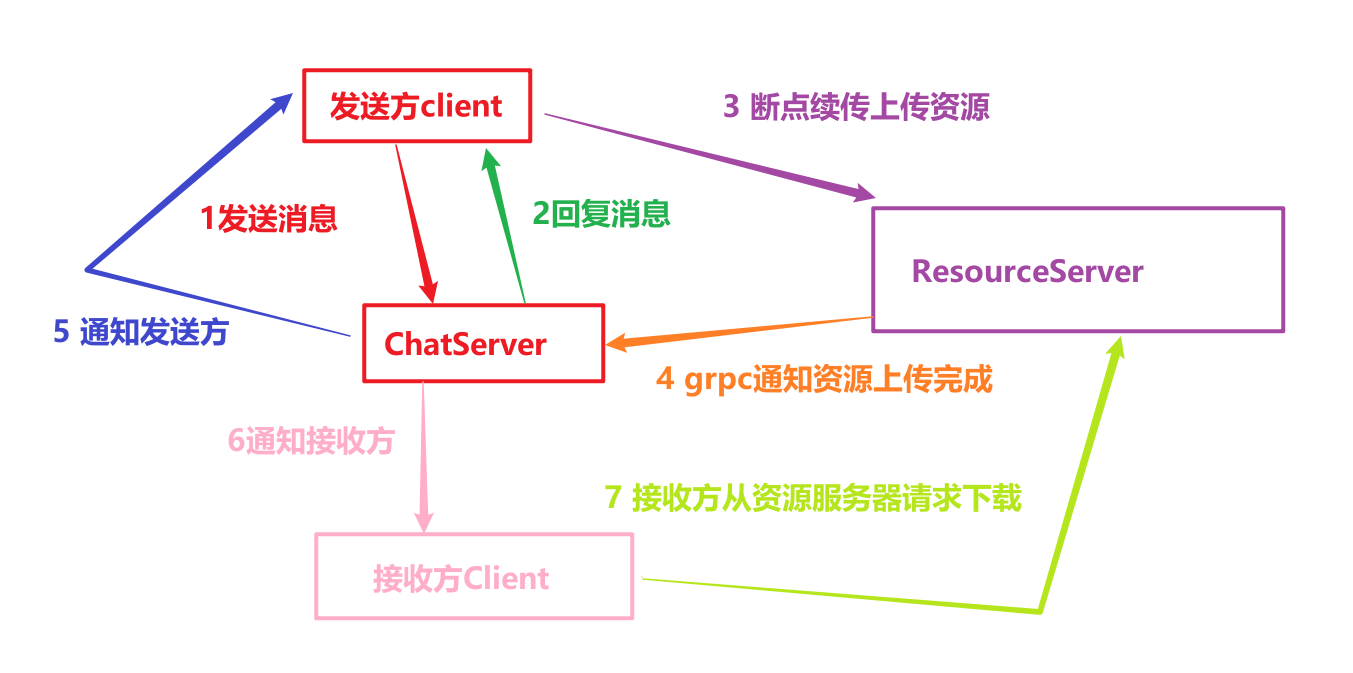
今天主要完成
4,6和7
资源服务器grpc设置
因为资源服务器要通知ChatServer,所以要设置grpc客户端
完善下proto协议,新增消息通知请求
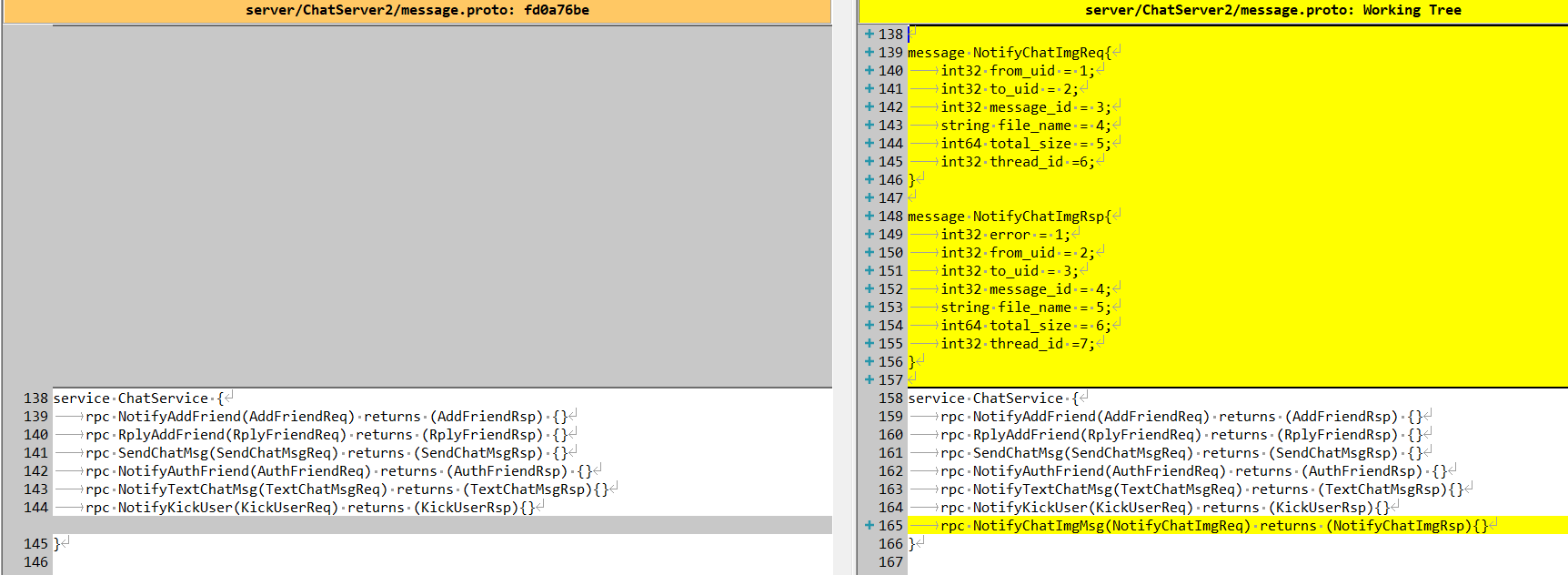
具体代码逻辑
message NotifyChatImgReq{int32 from_uid = 1;int32 to_uid = 2;int32 message_id = 3;string file_name = 4;int64 total_size = 5;int32 thread_id =6;}message NotifyChatImgRsp{int32 error = 1;int32 from_uid = 2;int32 to_uid = 3;int32 message_id = 4;string file_name = 5;int64 total_size = 6;int32 thread_id =7;}service ChatService {rpc NotifyAddFriend(AddFriendReq) returns (AddFriendRsp) {}rpc RplyAddFriend(RplyFriendReq) returns (RplyFriendRsp) {}rpc SendChatMsg(SendChatMsgReq) returns (SendChatMsgRsp) {}rpc NotifyAuthFriend(AuthFriendReq) returns (AuthFriendRsp) {}rpc NotifyTextChatMsg(TextChatMsgReq) returns (TextChatMsgRsp){}rpc NotifyKickUser(KickUserReq) returns (KickUserRsp){}rpc NotifyChatImgMsg(NotifyChatImgReq) returns (NotifyChatImgRsp){}}
实现grpc客户端逻辑如下:
#pragma once#include "const.h"#include "Singleton.h"#include "ConfigMgr.h"#include "message.grpc.pb.h"#include "message.pb.h"#include <grpcpp/grpcpp.h>#include <queue>#include <condition_variable>using grpc::Channel;using grpc::Status;using grpc::ClientContext;using message::ChatService;using message::NotifyChatImgReq;using message::NotifyChatImgRsp;class ChatServerConPool {public:ChatServerConPool(size_t poolSize, std::string host, std::string port): poolSize_(poolSize), host_(host), port_(port), b_stop_(false) {for (size_t i = 0; i < poolSize_; ++i) {std::shared_ptr<Channel> channel = grpc::CreateChannel(host + ":" + port,grpc::InsecureChannelCredentials());connections_.push(ChatService::NewStub(channel));}}~ChatServerConPool() {std::lock_guard<std::mutex> lock(mutex_);Close();while (!connections_.empty()) {connections_.pop();}}std::unique_ptr<ChatService::Stub> getConnection() {std::unique_lock<std::mutex> lock(mutex_);cond_.wait(lock, [this] {if (b_stop_) {return true;}return !connections_.empty();});//如果停止则直接返回空指针if (b_stop_) {return nullptr;}auto context = std::move(connections_.front());connections_.pop();return context;}void returnConnection(std::unique_ptr<ChatService::Stub> context) {std::lock_guard<std::mutex> lock(mutex_);if (b_stop_) {return;}connections_.push(std::move(context));cond_.notify_one();}void Close() {b_stop_ = true;cond_.notify_all();}private:atomic<bool> b_stop_;size_t poolSize_;std::string host_;std::string port_;std::queue<std::unique_ptr<ChatService::Stub>> connections_;std::mutex mutex_;std::condition_variable cond_;};class ChatServerGrpcClient :public Singleton<ChatServerGrpcClient>{friend class Singleton<ChatServerGrpcClient>;public:~ChatServerGrpcClient() {}NotifyChatImgRsp NotifyChatImgMsg(int message_id, std::string chatserver);private:ChatServerGrpcClient();//sever_ip到连接池的映射, <chatserver1,std::unique_ptr<ChatServerConPool>>std::unordered_map<std::string, std::unique_ptr<ChatServerConPool>> _hash_pools;};
具体实现
#include "ChatServerGrpcClient.h"#include "MysqlMgr.h"NotifyChatImgRsp ChatServerGrpcClient::NotifyChatImgMsg(int message_id,std::string chatserver){ClientContext context;NotifyChatImgRsp reply;NotifyChatImgReq request;request.set_message_id(message_id);if (_hash_pools.find(chatserver) == _hash_pools.end()) {reply.set_error(ErrorCodes::ServerIpErr);return reply;}auto chat_msg = MysqlMgr::GetInstance()->GetChatMsgById(message_id);request.set_file_name(chat_msg->content);request.set_from_uid(chat_msg->sender_id);request.set_to_uid(chat_msg->recv_id);request.set_thread_id(chat_msg->thread_id);// 资源文件路径auto file_dir = ConfigMgr::Inst().GetFileOutPath();//该消息是接收方客户端发送过来的,服务器将资源存储在发送方的文件夹中auto uid_str = std::to_string(chat_msg->sender_id);auto file_path = (file_dir / uid_str / chat_msg->content);boost::uintmax_t file_size = boost::filesystem::file_size(file_path);request.set_total_size(file_size);auto &pool_ = _hash_pools[chatserver];auto stub = pool_->getConnection();Status status = stub->NotifyChatImgMsg(&context, request, &reply);Defer defer([&stub, &pool_, this]() {pool_->returnConnection(std::move(stub));});if (status.ok()) {return reply;}else {reply.set_error(ErrorCodes::RPCFailed);return reply;}}ChatServerGrpcClient::ChatServerGrpcClient(){auto& gCfgMgr = ConfigMgr::Inst();std::string host1 = gCfgMgr["chatserver1"]["Host"];std::string port1 = gCfgMgr["chatserver1"]["Port"];_hash_pools["chatserver1"] = std::make_unique<ChatServerConPool>(5, host1, port1);std::string host2 = gCfgMgr["chatserver2"]["Host"];std::string port2 = gCfgMgr["chatserver2"]["Port"];_hash_pools["chatserver2"] = std::make_unique<ChatServerConPool>(5, host2, port2);}
实现了通知接口,用来通知ChatServer图片消息上传完成,让ChatServer再通知其他客户端.
ChatServer响应资源服务器通知
ChatServer的proto也需要进行同样配置,这里略去
具体在ChatServiceImpl中添加响应消息通知的逻辑
Status ChatServiceImpl::NotifyChatImgMsg(::grpc::ServerContext* context, const ::message::NotifyChatImgReq* request, ::message::NotifyChatImgRsp* response){//查找用户是否在本服务器auto uid = request->to_uid();auto session = UserMgr::GetInstance()->GetSession(uid);Defer defer([request, response]() {//设置具体的回包信息response->set_error(ErrorCodes::Success);response->set_message_id(request->message_id());});//用户不在内存中则直接返回if (session == nullptr) {//这里只是返回1个状态return Status::OK;}//在内存中则直接发送通知对方session->NotifyChatImgRecv(request);//这里只是返回1个状态return Status::OK;}
通过Session通知客户端
void CSession::NotifyChatImgRecv(const ::message::NotifyChatImgReq* request) {Json::Value rtvalue;rtvalue["error"] = ErrorCodes::Success;rtvalue["message_id"] = request->message_id();rtvalue["sender_id"] = request->from_uid();rtvalue["receiver_id"] = request->to_uid();rtvalue["img_name"] = request->file_name();rtvalue["total_size"] = std::to_string(request->total_size());rtvalue["thread_id"] = request->thread_id();std::string return_str = rtvalue.toStyledString();//通知图片聊天信息Send(return_str, ID_NOTIFY_IMG_CHAT_MSG_REQ);return;}
客户端获取通知
客户端收到服务器通知后,会优先查看本地资源是否存在,如果存在则直接加载图片,添加聊天记录到页面。
如果不存在则组织下载,但是也需要将消息添加到聊天界面。
_handlers.insert(ID_NOTIFY_IMG_CHAT_MSG_REQ, [this](ReqId id, int len, QByteArray data) {Q_UNUSED(len);qDebug() << "handle id is " << id << " data is " << data;// 将QByteArray转换为QJsonDocumentQJsonDocument jsonDoc = QJsonDocument::fromJson(data);// 检查转换是否成功if (jsonDoc.isNull()) {qDebug() << "Failed to create QJsonDocument.";return;}QJsonObject jsonObj = jsonDoc.object();qDebug() << "receive notify img chat msg req success" ;//收到消息后转发给页面auto thread_id = jsonObj["thread_id"].toInt();auto sender_id = jsonObj["sender_id"].toInt();auto message_id = jsonObj["message_id"].toInt();auto receiver_id = jsonObj["receiver_id"].toInt();auto img_name = jsonObj["img_name"].toString();auto total_size_str = jsonObj["total_size"].toString();auto total_size = total_size_str.toLongLong();auto uid = UserMgr::GetInstance()->GetUid();//客户端存储聊天记录,按照如下格式存储C:\Users\secon\AppData\Roaming\llfcchat\chatimg\uid, uid为对方uidQString storageDir = QStandardPaths::writableLocation(QStandardPaths::AppDataLocation);QString img_path_str = storageDir +"/user/"+ QString::number(uid)+ "/chatimg/" + QString::number(sender_id);auto file_info = UserMgr::GetInstance()->GetTransFileByName(img_name);//正常情况是找不到的,所以这里初始化一个文件信息放入UserMgr中管理if (!file_info) {//预览图先默认空白,md5为空file_info = std::make_shared<MsgInfo>(MsgType::IMG_MSG, img_path_str, CreateLoadingPlaceholder(200, 200), img_name, total_size, "");UserMgr::GetInstance()->AddTransFile(img_name, file_info);}file_info->_msg_id = message_id;file_info->_sender = sender_id;file_info->_receiver = receiver_id;file_info->_thread_id = thread_id;//设置文件传输的类型file_info->_transfer_type = TransferType::Download;//设置文件传输状态file_info->_transfer_state = TransferState::Uploading;auto img_chat_data_ptr = std::make_shared<ImgChatData>(file_info, "",thread_id, ChatFormType::PRIVATE, ChatMsgType::PIC,sender_id, MsgStatus::READED);emit sig_img_chat_msg(img_chat_data_ptr);//组织请求,准备下载QJsonObject jsonObj_send;jsonObj_send["name"] = img_name;jsonObj_send["seq"] = file_info->_seq;jsonObj_send["trans_size"] = "0";jsonObj_send["total_size"] = QString::number(file_info->_total_size);jsonObj_send["token"] = UserMgr::GetInstance()->GetToken();jsonObj_send["sender_id"] = sender_id;jsonObj_send["receiver_id"] = receiver_id;jsonObj_send["message_id"] = message_id;jsonObj_send["uid"] = uid;//客户端存储聊天记录,按照如下格式存储C:\Users\secon\AppData\Roaming\llfcchat\chatimg\uid, uid为对方uidQDir chatimgDir(img_path_str);jsonObj["client_path"] = img_path_str;if (!chatimgDir.exists()) {chatimgDir.mkpath("."); // 创建当前路径}QJsonDocument doc(jsonObj_send);auto send_data = doc.toJson();FileTcpMgr::GetInstance()->SendData(ID_IMG_CHAT_DOWN_REQ, send_data);});
收到服务器通知后,开始构造json数据,发送ID_IMG_CHAT_DOWN_REQ请求
聊天记录添加
客户端在请求服务器资源的时候,因为本地没有资源,可以先在聊天界面生成一个预览的空白图片,同时显示进度条
这部分逻辑是在客户端的tcpmgr中处理服务器通知聊天消息的逻辑里
_handlers.insert(ID_NOTIFY_IMG_CHAT_MSG_REQ, [this](ReqId id, int len, QByteArray data) {//...//发送给界面显示emit sig_img_chat_msg(img_chat_data_ptr);}
客户端将图片消息发送给界面显示
在ChatDialog的构造函数中添加信号槽链接
connect(TcpMgr::GetInstance().get(), &TcpMgr::sig_img_chat_msg,this, &ChatDialog::slot_img_chat_msg);
ChatDialog收到该信号后,会触发添加消息的逻辑
void ChatDialog::slot_img_chat_msg(std::shared_ptr<ImgChatData> imgchat) {//更新数据auto thread_id = imgchat->GetThreadId();auto thread_data = UserMgr::GetInstance()->GetChatThreadByThreadId(thread_id);thread_data->AddMsg(imgchat);if (_cur_chat_thread_id != thread_id) {return;}ui->chat_page->AppendOtherMsg(imgchat);}
添加其他消息的逻辑, 此处都是将其他人发送的图片消息添加到聊天界面显示
void ChatPage::AppendOtherMsg(std::shared_ptr<ChatDataBase> msg) {auto self_info = UserMgr::GetInstance()->GetUserInfo();ChatRole role;if (msg->GetSendUid() == self_info->_uid) {role = ChatRole::Self;ChatItemBase* pChatItem = new ChatItemBase(role);pChatItem->setUserName(self_info->_name);SetSelfIcon(pChatItem, self_info->_icon);QWidget* pBubble = nullptr;if (msg->GetMsgType() == ChatMsgType::TEXT) {pBubble = new TextBubble(role, msg->GetMsgContent());}else if (msg->GetMsgType() == ChatMsgType::PIC) {auto img_msg = dynamic_pointer_cast<ImgChatData>(msg);auto pic_bubble = new PictureBubble(img_msg->_msg_info->_preview_pix, role, img_msg->_msg_info->_total_size);pic_bubble->setMsgInfo(img_msg->_msg_info);pBubble = pic_bubble;//连接暂停和恢复信号connect(dynamic_cast<PictureBubble*>(pBubble), &PictureBubble::pauseRequested,this, &ChatPage::on_clicked_paused);connect(dynamic_cast<PictureBubble*>(pBubble), &PictureBubble::resumeRequested,this, &ChatPage::on_clicked_resume);}pChatItem->setWidget(pBubble);auto status = msg->GetStatus();pChatItem->setStatus(status);ui->chat_data_list->appendChatItem(pChatItem);_base_item_map[msg->GetMsgId()] = pChatItem;}else {role = ChatRole::Other;ChatItemBase* pChatItem = new ChatItemBase(role);auto friend_info = UserMgr::GetInstance()->GetFriendById(msg->GetSendUid());if (friend_info == nullptr) {return;}pChatItem->setUserName(friend_info->_name);// 使用正则表达式检查是否是默认头像QRegularExpression regex("^:/res/head_(\\d+)\\.jpg$");QRegularExpressionMatch match = regex.match(friend_info->_icon);if (match.hasMatch()) {pChatItem->setUserIcon(QPixmap(friend_info->_icon));}else {// 如果是用户上传的头像,获取存储目录QString storageDir = QStandardPaths::writableLocation(QStandardPaths::AppDataLocation);auto uid = UserMgr::GetInstance()->GetUid();QDir avatarsDir(storageDir + "/user/" + QString::number(uid) + "/avatars");auto file_name = QFileInfo(self_info->_icon).fileName();// 确保目录存在if (avatarsDir.exists()) {QString avatarPath = avatarsDir.filePath(file_name); // 获取上传头像的完整路径QPixmap pixmap(avatarPath); // 加载上传的头像图片if (!pixmap.isNull()) {pChatItem->setUserIcon(pixmap);}else {qWarning() << "无法加载上传的头像:" << avatarPath;auto icon_label = pChatItem->getIconLabel();LoadHeadIcon(avatarPath, icon_label, file_name, "self_icon");}}else {qWarning() << "头像存储目录不存在:" << avatarsDir.path();//创建目录avatarsDir.mkpath(".");auto icon_label = pChatItem->getIconLabel();QString avatarPath = avatarsDir.filePath(file_name);LoadHeadIcon(avatarPath, icon_label, file_name, "self_icon");}}QWidget* pBubble = nullptr;if (msg->GetMsgType() == ChatMsgType::TEXT) {pBubble = new TextBubble(role, msg->GetMsgContent());}else if (msg->GetMsgType() == ChatMsgType::PIC) {auto img_msg = dynamic_pointer_cast<ImgChatData>(msg);auto pic_bubble = new PictureBubble(img_msg->_msg_info->_preview_pix, role, img_msg->_msg_info->_total_size);pic_bubble->setMsgInfo(img_msg->_msg_info);pBubble = pic_bubble;//连接暂停和恢复信号connect(dynamic_cast<PictureBubble*>(pBubble), &PictureBubble::pauseRequested,this, &ChatPage::on_clicked_paused);connect(dynamic_cast<PictureBubble*>(pBubble), &PictureBubble::resumeRequested,this, &ChatPage::on_clicked_resume);}pChatItem->setWidget(pBubble);auto status = msg->GetStatus();pChatItem->setStatus(status);ui->chat_data_list->appendChatItem(pChatItem);_base_item_map[msg->GetMsgId()] = pChatItem;}}
资源服务器响应下载请求
LogicWorker中增加请求的处理
_fun_callbacks[ID_IMG_CHAT_DOWN_REQ] = [this](std::shared_ptr<CSession> session, const short& msg_req_id,const string& msg_data) {Json::Reader reader;Json::Value root;reader.parse(msg_data, root);auto seq = root["seq"].asInt();auto name = root["name"].asString();auto total_size_str = root["total_size"].asString();auto trans_size_str = root["trans_size"].asString();auto file_path = ConfigMgr::Inst().GetFileOutPath();auto message_id = root["message_id"].asInt();auto sender = root["sender_id"].asInt();auto receiver = root["receiver_id"].asInt();auto token = root["token"].asString();auto uid = root["uid"].asInt();auto callback = [=](const Json::Value& result) {// 在异步任务完成后调用Json::Value rtvalue = result;rtvalue["error"] = ErrorCodes::Success;rtvalue["name"] = name;rtvalue["sender_id"] = sender;rtvalue["receiver_id"] = receiver;std::string return_str = rtvalue.toStyledString();session->Send(return_str, ID_IMG_CHAT_DOWN_RSP);};// 使用 std::hash 对字符串进行哈希std::hash<std::string> hash_fn;size_t hash_value = hash_fn(name); // 生成哈希值int index = hash_value % DOWN_LOAD_WORKER_COUNT;std::cout << "Hash value: " << hash_value << std::endl;//第一个包校验一下token是否合理if (seq == 1) {//从redis获取用户token是否正确std::string uid_str = std::to_string(uid);std::string token_key = USERTOKENPREFIX + uid_str;std::string token_value = "";bool success = RedisMgr::GetInstance()->Get(token_key, token_value);Json::Value rtvalue;if (!success) {rtvalue["error"] = ErrorCodes::UidInvalid;std::string return_str = rtvalue.toStyledString();session->Send(return_str, ID_IMG_CHAT_DOWN_RSP);return;}if (token_value != token) {rtvalue["error"] = ErrorCodes::TokenInvalid;std::string return_str = rtvalue.toStyledString();session->Send(return_str, ID_IMG_CHAT_DOWN_RSP);return;}}auto sender_str = std::to_string(sender);//转化为字符串auto uid_str = std::to_string(uid);auto file_path_str = (file_path / sender_str / name).string();auto down_load_task = std::make_shared<DownloadTask>(session, uid, name, seq, file_path_str, callback);FileSystem::GetInstance()->PostDownloadTaskToQue(down_load_task,index);};
LogicWorker将请求投递给FileSystem队列,FileSystem队列排队处理消息,被DownloaderWorker处理
void DownloadWorker::task_callback(std::shared_ptr<DownloadTask> task){// 解码auto file_path_str = task->_file_path;//std::cout << "file_path_str is " << file_path_str << std::endl;boost::filesystem::path file_path(file_path_str);Json::Value result;result["error"] = ErrorCodes::Success;if (!boost::filesystem::exists(file_path)) {std::cerr << "文件不存在: " << file_path_str << std::endl;result["error"] = ErrorCodes::FileNotExists;task->_callback(result);return;}std::ifstream infile(file_path_str, std::ios::binary);if (!infile) {std::cerr << "无法打开文件进行读取。" << std::endl;result["error"] = ErrorCodes::FileReadPermissionFailed;task->_callback(result);return;}std::shared_ptr<FileInfo> file_info = nullptr;if (task->_seq == 1) {// 获取文件大小infile.seekg(0, std::ios::end);std::streamsize file_size = infile.tellg();infile.seekg(0, std::ios::beg);//如果为空,则创建FileInfo 构造数据存储file_info = std::make_shared<FileInfo>();file_info->_file_path_str = file_path_str;file_info->_name = task->_name;file_info->_seq = 1;file_info->_total_size = file_size;file_info->_trans_size = 0;// 立即保存到 Redis,覆盖旧数据,设置过期时间RedisMgr::GetInstance()->SetDownLoadInfo(task->_name, file_info);std::cout << "[新下载] 文件: " << task->_name<< ", 大小: " << file_size << " 字节" << std::endl;}else {//断点续传,从 Redis 获取历史信息file_info = RedisMgr::GetInstance()->GetDownloadInfo(task->_name);if (file_info == nullptr) {// Redis 中没有信息(可能过期了)std::cerr << "断点续传失败,Redis 中无下载信息: " << task->_name << std::endl;result["error"] = ErrorCodes::RedisReadErr;task->_callback(result);infile.close();return;}// 验证序列号是否匹配if (task->_seq != file_info->_seq) {std::cerr << "序列号不匹配,期望: " << file_info->_seq<< ", 实际: " << task->_seq << std::endl;result["error"] = ErrorCodes::FileSeqInvalid;task->_callback(result);infile.close();return;}std::cout << "[续传] 文件: " << task->_name<< ", seq: " << task->_seq<< ", 进度: " << file_info->_trans_size<< "/" << file_info->_total_size << std::endl;}// 计算当前偏移量std::streamsize offset = ((std::streamsize)task->_seq - 1) * MAX_FILE_LEN;if (offset >= file_info->_total_size) {std::cerr << "偏移量超出文件大小。" << std::endl;result["error"] = ErrorCodes::FileOffsetInvalid;task->_callback(result);infile.close();return;}// 定位到指定偏移量infile.seekg(offset);// 读取最多MAX_FILE_LEN字节char buffer[MAX_FILE_LEN];infile.read(buffer, MAX_FILE_LEN);//获取read实际读取多少字节std::streamsize bytes_read = infile.gcount();if (bytes_read <= 0) {std::cerr << "读取文件失败。" << std::endl;result["error"] = ErrorCodes::FileReadFailed;task->_callback(result);infile.close();return;}// 将读取的数据进行base64编码std::string data_to_encode(buffer, bytes_read);std::string encoded_data = base64_encode(data_to_encode);// 检查是否是最后一个包std::streamsize current_pos = offset + bytes_read;bool is_last = (current_pos >= file_info->_total_size);// 设置返回结果result["data"] = encoded_data;result["seq"] = task->_seq;result["total_size"] = std::to_string(file_info->_total_size);result["current_size"] = std::to_string(current_pos);result["is_last"] = is_last;infile.close();if (is_last) {std::cout << "文件读取完成: " << file_path_str << std::endl;RedisMgr::GetInstance()->DelDownLoadInfo(task->_name);}else {//更新信息file_info->_seq++;file_info->_trans_size = offset + bytes_read;//更新redisRedisMgr::GetInstance()->SetDownLoadInfo(task->_name, file_info);}if (task->_callback) {task->_callback(result);}}
资源服务器每次收到请求后,由DownloadWorker从队列中获取请求,查询服务器资源,将资源按照seq计算偏移量最后读取数据发送给客户端。
客户端存储下载的资源
客户端需要存储服务器传输的资源
_handlers.insert(ID_IMG_CHAT_DOWN_RSP, [this](ReqId id, int len, QByteArray data) {Q_UNUSED(len);qDebug() << "handle id is " << id << " data is " << data;// 将QByteArray转换为QJsonDocumentQJsonDocument jsonDoc = QJsonDocument::fromJson(data);// 检查转换是否成功if (jsonDoc.isNull()) {qDebug() << "Failed to create QJsonDocument.";return;}QJsonObject jsonObj = jsonDoc.object();if (!jsonObj.contains("error")) {int err = ErrorCodes::ERR_JSON;qDebug() << "parse create private chat json parse failed " << err;return;}int err = jsonObj["error"].toInt();if (err != ErrorCodes::SUCCESS) {qDebug() << "get create private chat failed, error is " << err;return;}qDebug() << "Receive download file info rsp success";QString base64Data = jsonObj["data"].toString();int seq = jsonObj["seq"].toInt();bool is_last = jsonObj["is_last"].toBool();QString total_size_str = jsonObj["total_size"].toString();qint64 total_size = total_size_str.toLongLong(nullptr);QString current_size_str = jsonObj["current_size"].toString();qint64 current_size = current_size_str.toLongLong(nullptr);QString name = jsonObj["name"].toString();auto file_info = UserMgr::GetInstance()->GetTransFileByName(name);if (file_info == nullptr) {qDebug() << "file: " << name << " not found";return;}file_info->_current_size = current_size;file_info->_rsp_size = current_size;file_info->_total_size = total_size;auto clientPath = file_info->_text_or_url;//Base64解码QByteArray decodedData = QByteArray::fromBase64(base64Data.toUtf8());auto file_path = clientPath + "/" + name;QFile file(file_path);// 根据 seq 决定打开模式QIODevice::OpenMode mode;if (seq == 1) {// 第一个包,覆盖写入mode = QIODevice::WriteOnly;}else {// 后续包,追加写入mode = QIODevice::WriteOnly | QIODevice::Append;}if (!file.open(mode)) {qDebug() << "Failed to open file for writing:" << clientPath;qDebug() << "Error:" << file.errorString();return;}qint64 bytesWritten = file.write(decodedData);if (bytesWritten != decodedData.size()) {qDebug() << "Failed to write all data. Written:" << bytesWritten<< "Expected:" << decodedData.size();}file.close();qDebug() << "Successfully wrote" << bytesWritten << "bytes to file";qDebug() << "Progress:" << current_size << "/" << total_size<< "(" << (current_size * 100 / total_size) << "%)";if (is_last) {qDebug() << "File download completed:" << clientPath;UserMgr::GetInstance()->RmvTransFileByName(name);//通知界面下载完成emit sig_download_finish(file_info, file_path);}else {//继续请求file_info->_seq = seq + 1;file_info->_last_confirmed_seq = seq;if (file_info->_transfer_state == TransferState::Paused) {//暂停状态,则直接返回return;}//组织请求,准备下载QJsonObject jsonObj_send;jsonObj_send["name"] = name;jsonObj_send["seq"] = file_info->_seq;jsonObj_send["trans_size"] = QString::number(file_info->_current_size);jsonObj_send["total_size"] = QString::number(file_info->_total_size);jsonObj_send["token"] = UserMgr::GetInstance()->GetToken();jsonObj_send["sender_id"] = file_info->_sender;jsonObj_send["receiver_id"] = file_info->_receiver;jsonObj_send["message_id"] = file_info->_msg_id;auto uid = UserMgr::GetInstance()->GetUid();jsonObj_send["uid"] = uid;QJsonDocument doc(jsonObj_send);auto send_data = doc.toJson();FileTcpMgr::GetInstance()->SendData(ID_IMG_CHAT_DOWN_REQ, send_data);//todo...通知界面更新进度emit sig_update_download_progress(file_info);}});
通过QFile类实现文件写入。
客户端进度显示
为了让客户端更为直观的显示下载进度,可以在收到服务器消息后,将文件下载进度同步给界面,同时显示支持暂停和继续
进度通知在上述逻辑中
_handlers.insert(ID_IMG_CHAT_DOWN_RSP, [this](ReqId id, int len, QByteArray data) {//...emit sig_update_download_progress(file_info);});
同样是在ChatDialog构造函数中添加消息链接
//接收tcp返回的下载进度信息connect(FileTcpMgr::GetInstance().get(), &FileTcpMgr::sig_update_download_progress,this, &ChatDialog::slot_update_download_progress);
进度处理槽函数
void ChatDialog::slot_update_download_progress(std::shared_ptr<MsgInfo> msg_info) {auto chat_data = UserMgr::GetInstance()->GetChatThreadByThreadId(msg_info->_thread_id);if (chat_data == nullptr) {return;}//更新消息,其实不用更新,都是共享msg_info的一块内存,这里为了安全还是再次更新下chat_data->UpdateProgress(msg_info);if (_cur_chat_thread_id != msg_info->_thread_id) {return;}//更新聊天界面信息ui->chat_page->UpdateFileProgress(msg_info);}
在ChatPage中详细处理更新
void ChatPage::UpdateFileProgress(std::shared_ptr<MsgInfo> msg_info) {auto iter = _base_item_map.find(msg_info->_msg_id);if (iter == _base_item_map.end()) {return;}if (msg_info->_msg_type == MsgType::IMG_MSG) {auto bubble = iter.value()->getBubble();PictureBubble* pic_bubble = dynamic_cast<PictureBubble*>(bubble);pic_bubble->setProgress(msg_info->_rsp_size, msg_info->_total_size);}}
PicBubble中完成状态显示
void PictureBubble::setProgress(int value, int total_value){if (m_total_size != total_value) {m_total_size = total_value;}float percent = (value / (m_total_size*1.0))*100;m_progressBar->setValue(percent);if (percent >= 100) {setState(TransferState::Completed);}}
断点续传
因为在客户端收到服务器通知的图片聊天信息的时候,已经通过sig_img_chat_msg将消息发送给ChatDialog添加到页面上了。同时传输了图片的状态为下载中。
点击继续和暂停的逻辑可以复用PicBubble的逻辑
void PictureBubble::onPictureClicked(){switch (m_state) {case TransferState::Downloading:case TransferState::Uploading:// 暂停setState(TransferState::Paused);emit pauseRequested(_msg_info->_unique_name, _msg_info->_transfer_type);break;case TransferState::Paused:// 继续resumeState(); //emit resumeRequested(_msg_info->_unique_name, _msg_info->_transfer_type);break;case TransferState::Failed:// 重试emit resumeRequested(_msg_info->_unique_name, _msg_info->_transfer_type);break;default:// 其他状态可以实现查看大图等功能break;}}
接下来我们响应暂停和继续,这部分逻辑也已经复用之前的逻辑即可
暂停逻辑
void ChatPage::on_clicked_paused(QString unique_name, TransferType transfer_type){UserMgr::GetInstance()->PauseTransFileByName(unique_name);}void UserMgr::PauseTransFileByName(QString name) {std::lock_guard<std::mutex> mtx(_trans_mtx);auto iter = _name_to_msg_info.find(name);if (iter == _name_to_msg_info.end()) {return;}iter.value()->_transfer_state = TransferState::Paused;}
恢复逻辑
void ChatPage::on_clicked_resume(QString unique_name, TransferType transfer_type){UserMgr::GetInstance()->ResumeTransFileByName(unique_name);//继续发送或者下载if (transfer_type == TransferType::Upload) {FileTcpMgr::GetInstance()->ContinueUploadFile(unique_name);return;}if (transfer_type == TransferType::Download) {FileTcpMgr::GetInstance()->ContinueDownloadFile(unique_name);return;}}void UserMgr::ResumeTransFileByName(QString name){std::lock_guard<std::mutex> mtx(_trans_mtx);auto iter = _name_to_msg_info.find(name);if (iter == _name_to_msg_info.end()) {return;}if (iter.value()->_transfer_type == TransferType::Download) {iter.value()->_transfer_state = TransferState::Downloading;return;}if (iter.value()->_transfer_type == TransferType::Upload) {iter.value()->_transfer_state = TransferState::Uploading;return;}}
发送继续下载信号通知FileTcpMgr继续下载
void FileTcpMgr::ContinueDownloadFile(QString unique_name) {emit sig_continue_download_file(unique_name);}
FileTcpMgr响应下载逻辑
void FileTcpMgr::slot_continue_download_file(QString unique_name) {auto file_info = UserMgr::GetInstance()->GetTransFileByName(unique_name);if (file_info == nullptr) {return;}if (file_info->_current_size >= file_info->_total_size) {qDebug() << "file has received finished";return;}//组织请求,准备下载QJsonObject jsonObj_send;jsonObj_send["name"] = unique_name;jsonObj_send["seq"] = file_info->_seq;jsonObj_send["trans_size"] = QString::number(file_info->_current_size);jsonObj_send["total_size"] = QString::number(file_info->_total_size);jsonObj_send["token"] = UserMgr::GetInstance()->GetToken();jsonObj_send["sender_id"] = file_info->_sender;jsonObj_send["receiver_id"] = file_info->_receiver;jsonObj_send["message_id"] = file_info->_msg_id;auto uid = UserMgr::GetInstance()->GetUid();jsonObj_send["uid"] = uid;QJsonDocument doc(jsonObj_send);auto send_data = doc.toJson();FileTcpMgr::GetInstance()->SendData(ID_IMG_CHAT_DOWN_REQ, send_data);}
通过上述逻辑可以实现客户端的断点下载和暂停。
效果演示
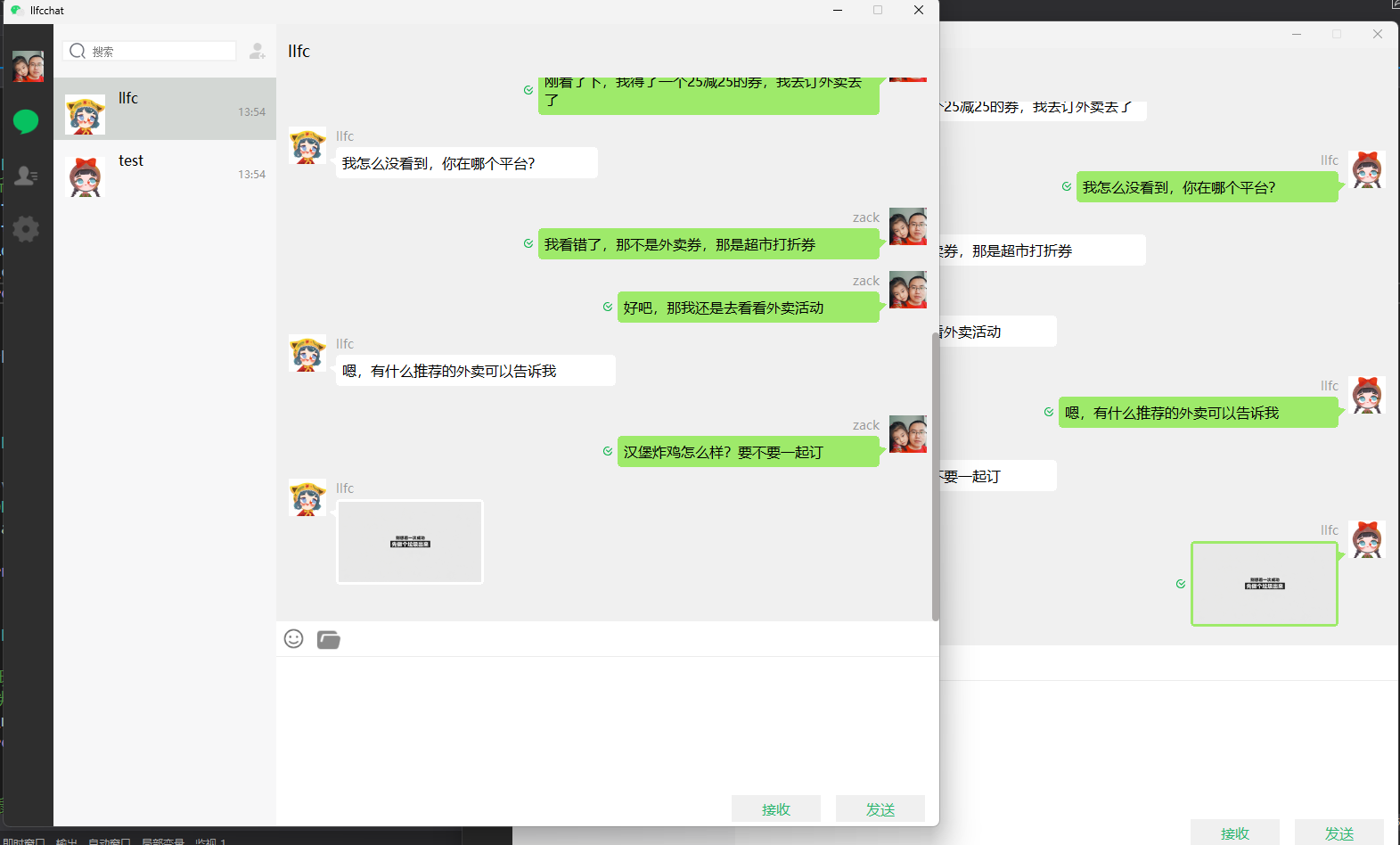
源码链接
https://gitee.com/secondtonone1/llfcchat
注意第二季分支为Season_2